![horizontalogo-1.png]](https://help.compstak.com/hs-fs/hubfs/horizontalogo-1.png?height=28&name=horizontalogo-1.png)
Try creating a Comp Alert to save your search filters for future use.
Once you add a comp alert (previously called 'Save Your Search') and opt in to email notifications, we'll let you know whenever we add a new comp that matches your search criteria.
To create a Comp Alert:
1. Select your search filters.
2. Click the 'Add Comp Alert' button in the bottom left.
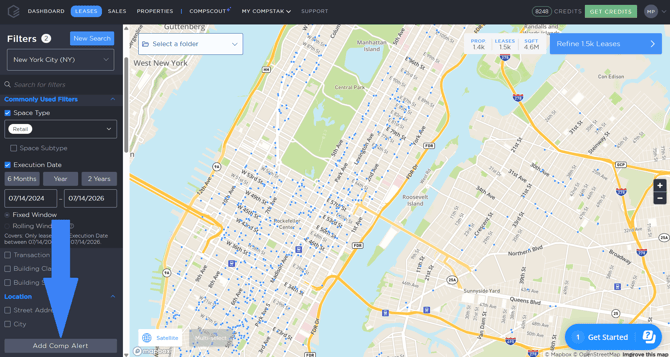
3. Name your Comp Alert.
4. To receive Comp Alerts, you can check the 'Get Instant Notifications' or 'Add to Digest' box.
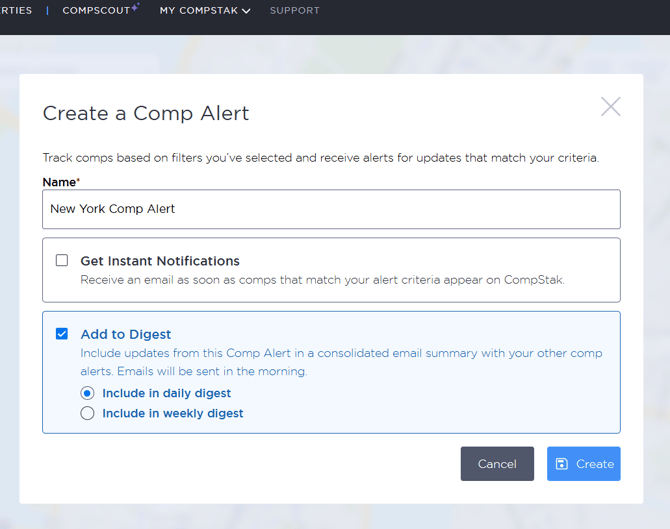
5. Click Create.
Once we add more comps that fit your comp alert criteria, you’ll receive email notifications with a quick summary.
To view or edit comp alerts:
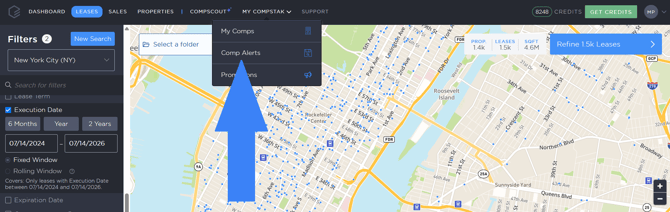
1. Click 'My CompStak' > 'Comp Alerts' on the upper left menu.
2. Select your Comp Alert and click on the three dots under the Edit option to open the menu. You can chose between the options: Edit Name & Notification, View & Adjust Filters, Duplicate, Share or Delete. 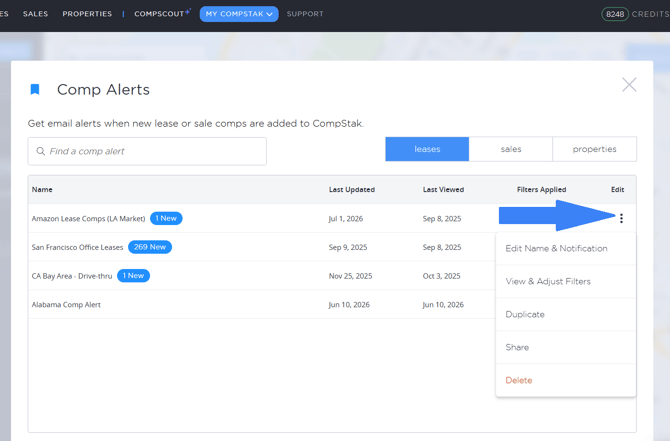
For a more comprehensive demonstration, you can check out this video as well.